Run your golf tournament without spending a dollar on software.
Free live scoring for charity scrambles, corporate outings, member-guests, club events, and leagues — scramble or shamble. Unique team links, printable cart cards, real-time leaderboards, and a messaging center. No per-player fees. No contracts. No software training for your volunteers.
Free for any event size. No download required for players.
Tournament organizers don't need more software. They need fewer things to worry about.
You're running a charity scramble, or a shamble tournament for your members — 48, 80, or 144 players. The clubhouse TV needs a leaderboard. The volunteer team's never used tournament software before. And the budget already disappeared into pin flags, lunch, and prizes. The list gets long, fast.
The major tournament platforms — Golf Genius, BlueGolf, USGA TM — are built for tour events and golf associations. They're powerful. They're also expensive, contract-based, and require training nobody on your committee has time for.
Meanwhile, the do-it-yourself path is either a bare-bones platform, or a printed scorecard, a runner collecting papers, and an Excel spreadsheet. By lunch, the standings are wrong. By the awards ceremony, three teams are pretty sure they finished higher than what got announced.
ForeBoard is the middle path. Real tournament tools, no contract, no fee.
ForeBoard's Tournament Mode handles every part of an organizer-run event: the roster, the team assignments, the shotgun start, the scoring, the leaderboard, and the team-by-team communication. Setup takes 15–20 minutes for a fresh event with a ready roster. Players score from a unique team link — no app, no account, no friction. And every feature is free, regardless of event size.
It's built specifically for the events that don't have a software budget but still deserve to run cleanly and maximize the golfer experience so they come back next year.
The Tournament Hub: one screen for the whole event.
Everything an organizer touches lives on one dashboard. Roster, teams, course, starting holes, scoring links, cart cards, live progress, team messaging — all in one place, accessible from a phone or laptop.
Unique team scoring links
Every team gets its own private scoring link. Send them all at once via email blast from the Tournament Hub, or print them onto cart cards as QR codes. Teams open the link, enter scores, and the leaderboard updates in real time.
Printable cart cards
Generate team-specific cart cards in one click. Each card shows the team name, starting hole, scoring QR code, and shotgun pairing. Print them the morning of the event and you're done — no day-of confusion about who goes where.
Tournament Hub messaging
Send notes, rule clarifications, or fundraising reminders directly to specific teams or the entire field from a single screen. No more group texts, no more PA announcements that nobody can hear past the practice green.
Live leaderboards on any screen
Cast the leaderboard to a clubhouse TV, project it onto a wall, or open it on a phone. Spectators, sponsors, and players can all watch the standings update in real time as scores come in. The shareable link works in any browser.
Bulk roster management
Paste your full player roster and it's in. Assign players to teams in bulk by pasting names. Move players, remove no-shows, add walk-ons — all of it works during the event without restarting anything.
Real-time progress tracking
See which teams have started, which holes everyone is on, and which teams haven't entered scores in the last 20 minutes. Spot pace-of-play issues before they become problems.
Scramble or shamble. Gross or net. Your choice, fully scored.
ForeBoard Tournament Mode supports both major team formats with handicap-aware net scoring on each. Pick the one your event uses; we handle the math.
Scramble
All players hit, the team selects the best shot, everyone plays from there. One team score per hole. ForeBoard's scramble flow is built for one scorekeeper per team entering a single number on each hole.
ForeBoard can calculate team handicaps for net scoring using each player's individual handicap.
Shamble
All players hit the tee shot, the team selects the best one, then everyone plays their own ball for the rest of the hole. Lowest individual score becomes the team score. ForeBoard collects each player's score and applies the best one automatically.
Net scoring applies handicap strokes to each player individually before selecting the team's best score.
How a tournament runs on ForeBoard.
From event creation to final leaderboard, here's the whole workflow.
Create the event
Name the event, set the date, pick scramble or shamble, choose gross or net. Search for the course in the 30,000-course database (or add one manually in two minutes). About 60 seconds.
Build the roster
Add teams (one at a time or in bulk). Add players (one at a time or paste a list). Assign players to teams. The whole roster step typically runs 5–10 minutes for a 20-team event with a list ready to paste.
Assign starting holes
For shotgun starts, assign each team a starting hole using the list view or hole map. ForeBoard handles A/B group designations automatically. Cart cards print with everything teams need to know.
Distribute scoring links
From the Tournament Hub, blast unique scoring links to every team via email, text, or printed QR codes on cart cards. Each team's link is private — only they can score for their team.
Run the event
Players score from their phones. The leaderboard updates live on every screen — phones, the clubhouse TV, the spectator link sent to anyone watching from home. Use Tournament Hub messaging to send rule clarifications, weather updates, or reminders to specific teams or the full field.
Crown the winners
When the round ends, the final leaderboard is set. Use it for the awards ceremony directly, screenshot it for social, or share the spectator link with sponsors and members who weren't at the event.
When the event wraps, everyone leaves with the recap.
ForeBoard sticks around after the last group walks off 18. Three deliverables go out automatically — one for each team, one for the organizer, and one for everybody to share.
Team summary email
Each team gets a clean recap — their final score, leaderboard position, hole-by-hole performance, and any awards earned. Useful for sponsor reporting, email forwards, and post-round bragging rights.
Organizer event recap
The tournament organizer receives a comprehensive summary — full leaderboard, awards, team-by-team performance, total participation. The version you'll send to the board, the sponsors, and your committee planning next year's event.
Shareable leaderboard graphic
Players, organizers, and sponsors all get a one-tap shareable leaderboard graphic. Drops cleanly into the group chat, an Instagram story, or a Facebook post. The easy way to extend the event's reach beyond the people who were there.
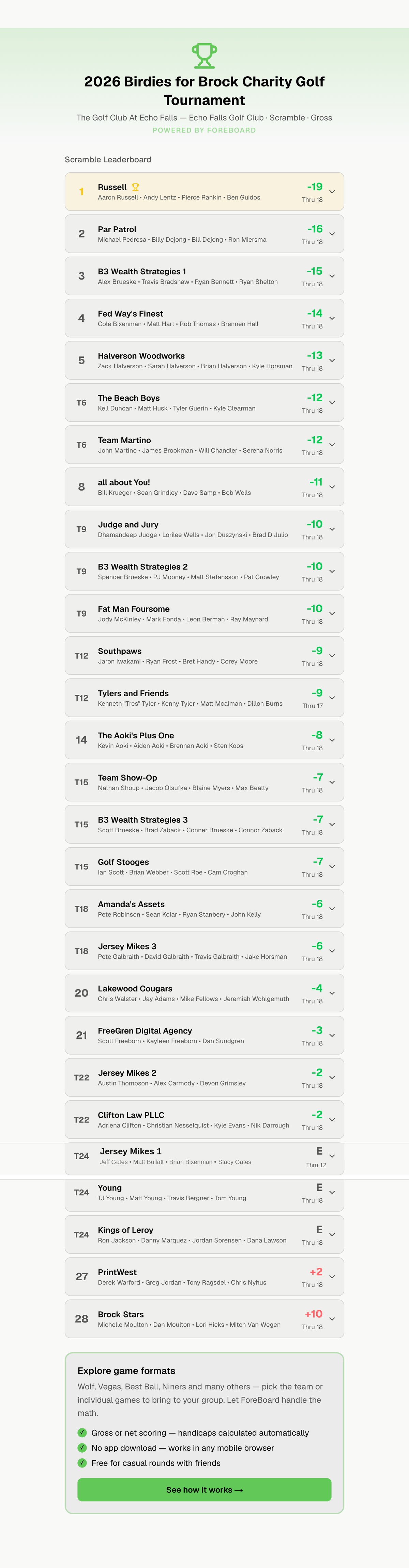
Birdies for Brock 2026: 110 golfers, 28 teams, one platform.
Elise Brueske is a professional event marketer who ran this tournament on Golf Genius and Live Tourney before switching to ForeBoard for its biggest year yet. Every team scored live from a phone browser. Zero paper cards. Zero organizer nudges all day.
“I don't know why you would continue using paper when you have something as easy as ForeBoard. You're not asking for an app — some people don't want to download an app. But scanning a QR code — people are doing that at restaurants, on signs, to pay medical bills. Everybody is learning how to do that now. Why not make everybody's life easier and less manual?”
Why ForeBoard, and not Golf Genius or BlueGolf.
Golf Genius and BlueGolf are excellent platforms — for the events they're built for. They're used by tour events, the USGA, and large golf associations that have full-time staff and substantial budgets. They charge accordingly: annual contracts, per-event fees, or per-tournament licensing that adds up fast.
ForeBoard is built for the much larger universe of tournaments that don't fit that profile: a charity scramble that's already donating its proceeds, a corporate outing run by an HR coordinator, a high school golf team fundraiser. These events need real tournament tools but cannot justify enterprise software pricing.
Free at any size
No per-player fees, no per-event fees, no premium tier. Whether it's 12 teams or 60.
Setup in 15 minutes
For a fresh event with a ready roster. No software training required.
No accounts for players
Each team uses a private scoring link. Open it, score, done.
Live leaderboard everywhere
Cast it to a clubhouse TV, share with sponsors, post the link publicly.
Built-in team messaging
Send rule updates, weather notes, or sponsor messages from one screen.
Real-time progress visibility
See which teams have started, which are slow, which are caught up.
Questions tournament organizers ask.
Is ForeBoard truly free for tournaments, or is there a fee for larger events?
ForeBoard is free regardless of event size. There are no per-player fees, no per-event fees, no premium tier, and no upsell. Whether you're running a 48- or 144-person tournament, the cost is the same: zero. Most tournament software charges per team, per event, or for post-event reporting. ForeBoard doesn't — every feature is free at any size.
How is ForeBoard different from Golf Genius or BlueGolf?
Golf Genius and BlueGolf are enterprise tournament platforms used by tour events, USGA championships, and golf associations. They are powerful, but they require contracts, training, and per-event or annual fees that can run into the thousands. ForeBoard is built for the other 95% of tournaments: charity scrambles, corporate outings, and club shambles. It does the things organizers actually need — unique team links, cart cards, live leaderboards, team messaging — without the contract or the price tag.
Do players need to download an app or create accounts?
No. Players don't download anything and don't create accounts. Each team uses a unique scoring link delivered by email, text, or QR code on a cart card. They open the link in any phone browser, enter scores hole by hole, and the leaderboard updates. The link is private to that team — no one else can edit their scores. This is the single biggest reason ForeBoard works on event day: there is no friction for players.
What tournament formats does ForeBoard support?
ForeBoard supports both Scramble and Shamble formats, with gross or net scoring on each. In Scramble, the team plays one ball after each shot and enters one score per hole. In Shamble, all players hit the tee shot, the team selects the best one, then everyone plays their own ball — the lowest individual score becomes the team score for the hole. Both formats fully support handicap-aware net scoring using real course data.
How do I set up a shotgun start?
When you create the tournament, ForeBoard prompts you to assign teams to starting holes. You can use a list view (type the hole number next to each team) or a hole map view (drag teams onto a visual grid of the 18 holes). When two teams start on the same hole, ForeBoard automatically designates A and B groups based on the order you assigned them. Cart cards print with the starting hole and A/B designation, so every team knows exactly where to go.
What happens if a team doesn't enter scores in real time?
Scores can be entered in real time as the round progresses or all at once at the turn or the end of the round — whatever your event prefers. Although, we recommend real-time score entry. Some events have a single scorekeeper per team, others ask every player to update independently. ForeBoard accommodates both. Live leaderboards update as scores come in, but no one is locked out if they fall behind.
What if cell service is bad on the course?
Phones hold entered scores locally and sync once a connection returns. You won't lose data because a team walked through a dead spot on the back nine. The leaderboard catches up automatically when the team is back in coverage.
Can I make late roster changes — adding walk-ons or removing no-shows?
Yes, even during the round. Add a walk-on team in 30 seconds and they appear on the leaderboard for the holes they play going forward. Remove a no-show team and they disappear cleanly. ForeBoard is designed for the realities of tournament day, not just the clean version on the planning spreadsheet.
How long does setup actually take?
For a typical 20-team charity scramble: about 15–20 minutes if you're entering the roster fresh. With a roster ready to paste, closer to 5–10 minutes. Because an account isn't needed, you can create a sample tournament to see how easy it is.
Will ForeBoard work for member-guest events, club championships, or corporate outings?
Yes — ForeBoard is built for any organizer-run event in this category. Member-guest tournaments, charity scrambles, club shambles, corporate outings, member appreciation days, league championships. The same scoring engine, the same Tournament Hub, the same zero cost.
Run a real tournament. Spend zero on software.
Live leaderboards, unique team links, printable cart cards, and Tournament Hub messaging — free for charity, corporate, club, and member-guest events of any size.